Home
TOAD (Tipping and Other Abrupt events Detector) is a Python framework for detecting and clustering spatio-temporal patterns in gridded Earth-system datasets. It is presented in detail in Harteg et al. (2026), available as a preprint on EGUsphere.
Note
For general information, project overview, and the latest updates, visit the TOAD GitHub repository.
If you’re new to TOAD, start with the Installation guide and then follow the Quick Start tutorial.
What’s in this documentation?
This documentation provides comprehensive guides for using TOAD in your research:
Installation - Installation instructions for different environments
Quick Start - Get started with TOAD in minutes
Tutorials - Detailed tutorials covering core concepts and advanced usage
Spacetime consensus clustering - Spacetime consensus clustering algorithm and parameters (hands-on tutorial)
API Reference - Complete API reference for all classes and functions
Scientific References - Scientific references and methodology details
Release Notes - Version history and changelog
The TOAD Pipeline
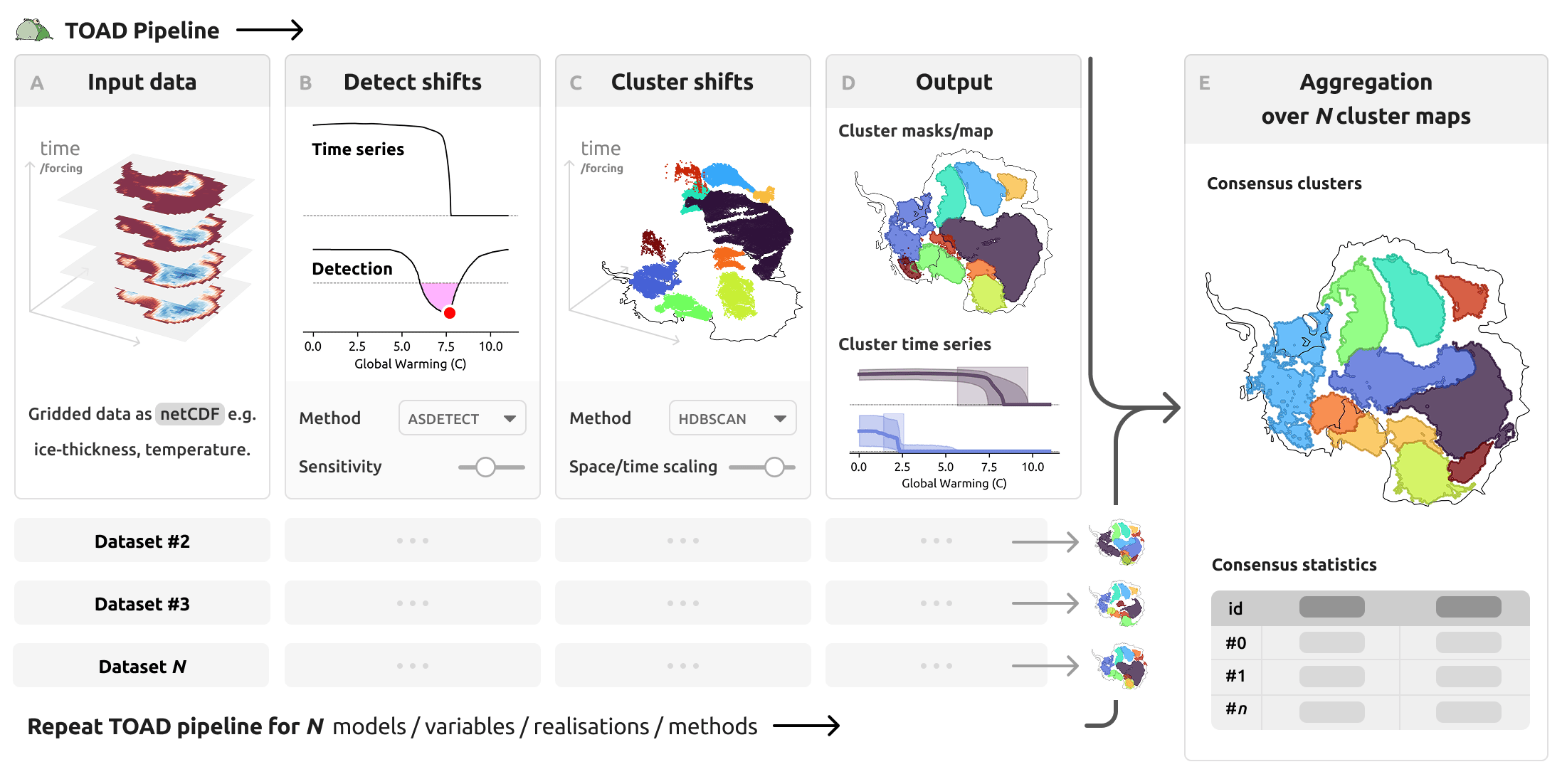
TOAD provides a structured workflow for analyzing Earth-system data:
Shift Detection: Identify abrupt transitions at individual grid cells using configurable detection methods
Clustering: Group detected shifts spatially and temporally to reveal cohesive patterns
Aggregation & Synthesis: Aggregate results across multiple datasets, models, or methods to produce consensus clusters — see Spacetime consensus clustering and the Consensus tutorial
About
TOAD is developed at the Potsdam Institute for Climate Impact Research (PIK) and the Max Planck Institute of Geoanthropology. The project originated from early prototype work by Sina Loriani in 2022. Since 2024, Jakob Harteg has led the full development of the package as part of his PhD project. Over time, numerous contributors have played important roles at various stages, including Lukas Röhrich and Fritz Kühlein. The project has also benefited greatly from scientific advice and guidance from Sina Loriani, Jonathan Donges, Ricarda Winkelmann, and many others. Community contributions, such as feature suggestions, bug reporting, or even extensions like new detection algorithms, are very welcome.
Getting Help
Documentation: Browse the sections above or use the search function
GitHub Issues: Report bugs or request features on GitHub
Source Code: View the source code on GitHub